My Row Counter: Knit & Crochet
- 4.8
- Rating
- 1.00M
- Installs
- Free
- Price
 Analysis by App-foxy
I use My Row Counter: Knit & Crochet as a practical companion rather than as a replacement for a printed pattern or a notebook. That distinction matters. The app is built for people who want their current row, round, timer, and pattern in one place, especially when a project is interrupted throughout the day. In my experience, its biggest strength is reducing small bits of mental bookkeeping without trying to turn knitting or crochet into something overly complicated.
Developed by Annapurnapp Technologies GmbH, this free lifestyle app has earned a 4.8 average from around 15K ratings and has passed one million installs. Those figures suggest that it has found a broad audience, but popularity alone does not tell me whether it fits a particular workflow. The useful question is whether you want a focused project aid that can keep your place, or whether you are happier with paper, a basic tally counter, or a full pattern-management service.
How the app feels during real projects
I find a craft app earns trust by helping me keep track without asking me to hand over more attention than the project requires. My Row Counter’s appeal is the practical link between a count and the work it belongs to, but I still judge any digital companion by how clearly I can manage my own project information. That question leads naturally to the choices I would check before settling into a routine.
You May Also Like

 Blood Strike: 2.5 Anniversary
Blood Strike’s Loadouts Turn Every Drop Into a Tactical Gamble
A close look at Blood Strike’s custom loadouts: how fast access to signature weapons reshapes its battle royale rhythm, rewards preparation, and narrows the gap between fights.

 Pandora - Music & Podcasts
Pandora’s Music Is Easy to Start, but Harder to Recover
Pandora’s strength is its low-effort path from a seed to a station. Its weak spot is how much confidence it asks you to place in connection, setup, and quiet recovery.

 8 Ball Pool
 Is Built on Rivalries, Rematches, and Routine
A close look at the rivalries, rematches, shared routines, and unanswered safety questions that turn a quick pool match into a persistent mobile community.

 Samsung Music
’s Quiet Strength Is Playing What You Already Own
Its reach comes less from spectacle than from dependable access to a personal library. That simplicity is both the app’s strongest retention engine and its ceiling.

 AccuWeather: Weather Radar
AccuWeather Review: A Quick, Clear Forecast for Everyday Decisions
For everyday plans, the best forecast is the one you can understand quickly. AccuWeather makes rain timing, radar, and local conditions easy to act on, with a few trade-offs.

 Hill Climb Racing
Why Hill Climb Racing Still Turns Crashes Into One More Run
A tiny car, a bumpy hill and one more upgrade: Hill Climb Racing keeps resurfacing because its simple chaos makes every near-miss feel personal.
More From Our News Desk



Quick starts and sensible speed expectations
The first useful test is how quickly I can get from opening the app to counting. A row counter only helps if it does not make the beginning of a project feel like administrative work. My Row Counter: Knit & Crochet is aimed at that short path: choose or create a project, keep the count visible, and return to the work. The interface is more purposeful than a general notes app because the counting task stays at the center.
For a simple scarf or a small crochet motif, I would expect the app to feel comfortably direct. There is no reason to build a complicated digital system when all I need is a number that advances as I work. The timer and pattern tools become more valuable when a project lasts for days or weeks, because they give the project a little more context than a loose note on my phone.
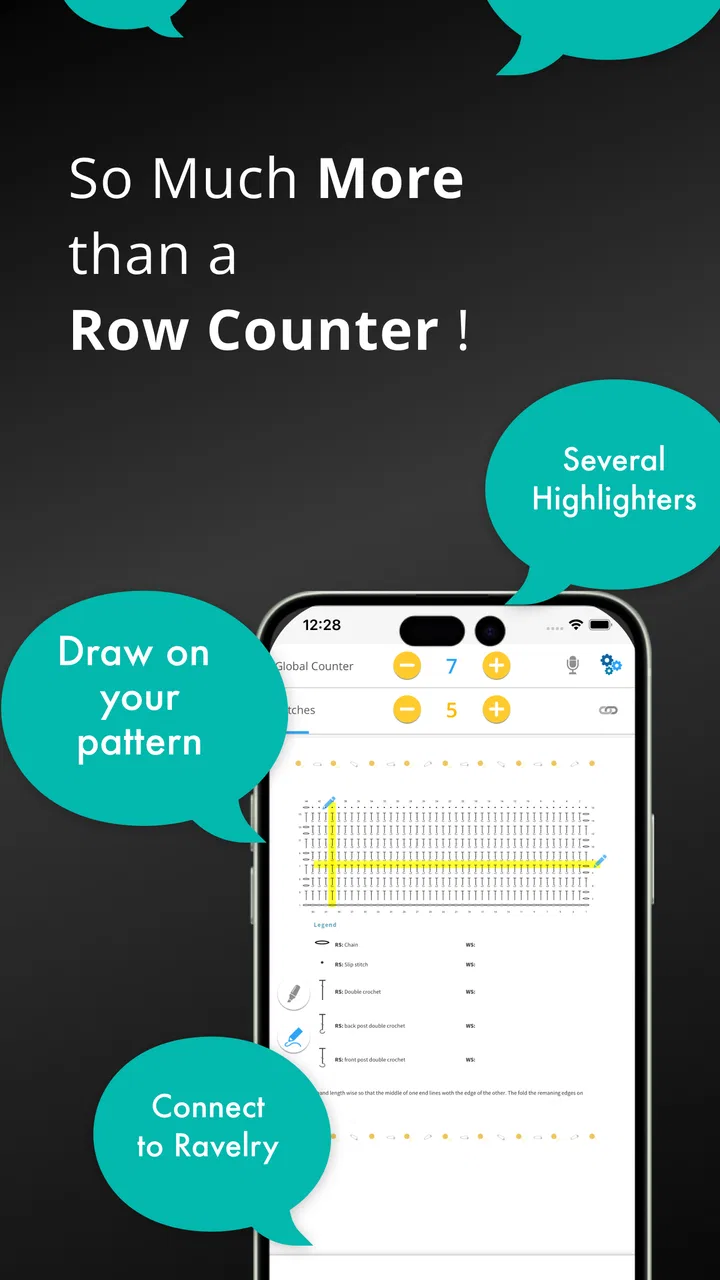
The app’s store summary points to pattern import, a timer, a highlighter, and Ravelry-related use alongside the counter. That combination changes the experience from “tap a number” to “keep a project organized.” I particularly like the idea of having a pattern available while working instead of switching repeatedly between a browser, a document, and a separate counter. The trade-off is that a richer workspace naturally takes more setup than a physical clicker.
Where it helps during heavy-use moments
The most convincing use case is an interrupted evening project. Imagine working through a repeating sweater section while listening to something, stopping to make dinner, then returning later with several similar-looking rows behind you. A paper mark can work, but it is easy to forget whether it refers to the last completed row or the next one. A dedicated counter gives me a clearer checkpoint, while a timer can help me understand how long the session lasted.
Another useful situation is a pattern with separate counts for rows, repeats, and shaping. I would not treat one visible counter as a substitute for careful pattern reading, but the app can reduce the number of loose reminders I keep around the project. The highlighter is potentially useful here: marking my place in a digital pattern can be quicker than searching through a long page every time I resume.
For crochet, the same idea applies to rounds and repeated motifs. I can imagine using it while making several matching pieces, where the main challenge is not learning the stitch but remembering which round each piece has reached. The benefit is consistency. Instead of trusting memory after an interruption, I can leave a project with a deliberate digital checkpoint.
There is also a less obvious benefit to separating project information from ordinary phone notes. A note might contain a number, but it does not necessarily communicate what that number means. In a project-focused app, the count belongs to the craft task, so I am less likely to confuse a sleeve row with a blanket row. That is a small improvement, but repeated small errors are exactly what make long projects frustrating.
Reliability depends on the habit around the counter
No digital counter can rescue a count that was tapped inconsistently. My most important practical advice is to decide before starting whether the number represents the row just completed or the row currently in progress. I would also make the tap part of the same physical motion every time. If I sometimes tap after turning and sometimes before turning, the app may remain perfectly reliable while my project record becomes ambiguous.
This is where the app’s focused design is more useful than a generic tally tool. The counter is attached to a named activity rather than floating alone. When I return after a break, the project context gives me a better chance of remembering what I was doing. I still recommend checking the pattern and the fabric when resuming, particularly after a complex increase or decrease section.
Pattern import and highlighting can improve recovery after interruptions, but they do not remove the need for a physical marker or a quick visual inspection. If I close a project halfway through a complicated repeat, I would rather leave an extra note in the pattern or place a marker in the work than rely only on a number. The app is best as one layer of recovery, not the entire recovery plan.
That distinction also matters when working across multiple projects. A digital project list can be clearer than several paper scraps, but only if I keep each project updated. If I create many entries and stop maintaining them, the organization advantage fades. I would start with the projects I actively use, give them recognizable names, and avoid turning the app into an archive of every abandoned idea.
Resource demands and device constraints
As a lifestyle utility, this is not the sort of app I choose for graphics-heavy entertainment or complex media editing. My expectation is that its basic counting work should feel lightweight on a modern phone. The more demanding part of the experience is not the counter itself, but the combination of reading a pattern, navigating project information, using a highlighter, and keeping a timer available during a long session.
Screen size can make a real difference. On a larger phone or tablet, a pattern is easier to read beside the controls. On a compact phone, I would expect more scrolling and more frequent attention shifts, especially with dense instructions. Someone who primarily works from printed patterns may find the app’s digital reading tools less important, while a person who already keeps patterns on a phone may appreciate having the counting workflow closer at hand.
I would also think about battery and attention in practical terms. A counter does not need constant interaction, but a timer and an on-screen pattern encourage longer screen sessions. If I am crafting away from a charger, I would keep the display behavior and general phone settings in mind rather than assuming that any app can run indefinitely without affecting battery life. The app’s value is strongest when I open it for a task, update the project, and return to the work—not when I leave every tool active unnecessarily.
For older or constrained devices, the sensible approach is to begin with the basic counter and add the pattern workflow only if it feels comfortable. I would not judge the whole app by an advanced reading task on a small screen. Conversely, if someone wants a completely offline-feeling paper experience with no screen involved, this will not be the right solution regardless of how smoothly the counter operates.
Comparing it with paper, a clicker, and broader craft tools
A physical clicker remains hard to beat for immediate simplicity. It has one job, requires no screen, and can be operated without worrying about opening the correct project. For a person who only needs to count rows on one ongoing item, a clicker may be faster and less distracting. The weakness is that it carries little context: it cannot show a pattern, preserve a highlighted location, or help me remember which project the number belongs to.
Paper has a different advantage. I can write shaping notes, sketch a repeat, and mark a correction in whatever form makes sense. It is flexible and works anywhere. Its downside is that recovery depends on my handwriting and discipline. A digital counter is cleaner for a simple number, while paper can be better for messy, evolving notes. I often see them as complementary rather than competing choices.
A general notes app is more adaptable than a dedicated counter, but that flexibility creates friction. I would need to design my own structure for project names, counts, timers, and pattern references. My Row Counter: Knit & Crochet saves that setup by starting from the needs of knitters and crocheters. The price of that convenience is accepting a more specialized workflow instead of having a blank canvas.
Ravelry-centered workflows can be useful for people who already organize their patterns and projects there. The app’s connection to that kind of pattern use makes it more appealing to an established craft routine than to someone who only wants a bare counter. Still, I would not choose it solely because of one integration. The real value comes from combining the counter with the pattern and project tools in a way that matches how I actually work.
Who should use it, and who should skip it
I would recommend this app to knitters and crocheters who regularly lose their place, move between several projects, or work from digital patterns. It is especially suitable for people who want one project view instead of a counter in one hand and a pattern in another. It also makes sense for anyone who likes tracking a session with a timer or wants a more deliberate way to resume work after a busy day.
I would be more cautious if you dislike using a phone while crafting. If your ideal setup is a printed pattern, a pencil, and a physical counter, the extra digital layer may feel unnecessary. The same is true for very casual projects where the count is easy to remember. A free app can still cost attention, and not every project benefits from more organization.
Beginners may appreciate the structure, but they should not expect it to teach knitting or crochet from the ground up. A counter can tell me where I am; it cannot replace understanding abbreviations, stitch anatomy, tension, or pattern construction. For learning, I would pair it with a clear tutorial or pattern guide and use the app as the place where I keep my progress.
Price, access, and the practical trade-off
The app is free to start, with in-app purchases ranging from under a dollar to about fifteen dollars per item. That makes it easy to test the basic workflow before deciding whether additional options fit my routine. I appreciate that approach for a utility app, because the right choice depends heavily on whether I actually use pattern tools and project organization rather than merely liking the idea of them.
It is rated for Everyone, which fits the straightforward nature of the tool. The app has been available since January 2018, giving it a longer presence than a newly launched experiment. I would still evaluate it by current usefulness: can I find my project quickly, understand the count, and recover my place without hesitation?
One practical tip is to try it first on a project with a known pattern and frequent interruptions. That reveals more than testing it on a simple swatch. I would create the project, import or open the relevant pattern if that is part of my workflow, use the highlighter on a real section, and see whether returning the next day feels clearer than returning to paper. If the answer is no, the app may be more machinery than I need.
My performance verdict after weighing the workflow
My overall impression is that My Row Counter: Knit & Crochet is strongest when the problem is continuity. It helps connect a count, a pattern, a timer, and a project so that a short crafting session can resume without rebuilding the context from memory. The basic task should feel quick, while the more advanced workflow asks for a little setup and a screen that is comfortable enough for reading.
I would not describe it as universally better than a clicker or notebook. Those alternatives win when speed means immediate physical access, zero screen time, or unrestricted handwritten notes. This app wins when speed means finding the right project, checking the pattern, and knowing what I was doing after an interruption. That is a different definition of fast, and it is the one that matters during long, stop-and-start projects.
Its reliability is also partly behavioral. I need a consistent tapping habit, sensible project organization, and a backup marker for complicated sections. Used that way, the app can remove a surprising amount of low-level frustration. Used carelessly, it can give me a false sense of security while I still lose track of repeats or shaping instructions.
For me, the deciding question is simple: do I want a digital workspace built around craft progress, or do I only need a number? If I want the former, this free lifestyle app is a thoughtful option with enough depth to support real projects without forcing me into a general productivity system. If I only want the latter, a physical counter will probably be less distracting. The best reason to install it is not the row number alone, but the easier recovery when real life interrupts the project.
FAQs for My Row Counter: Knit & Crochet
01What is My Row Counter: Knit & Crochet used for?
My Row Counter: Knit & Crochet is designed to help knitters and crocheters keep track of rows, rounds, repeats, and project progress. Instead of relying on memory or manually marking paper, you can use digital counters for one or more projects. It is particularly useful when working on patterns that require frequent interruptions, detailed stitch repeats, or several active projects at the same time.
02Can I use the app for both knitting and crochet projects?
Yes. The app is intended for both knitting and crochet, so it can be adapted to different types of projects, including garments, blankets, accessories, amigurumi, and other handmade items. Depending on your pattern, you can create counters for rows, rounds, repeats, or sections. It is still important to configure each counter carefully, because the app records what you enter rather than automatically identifying your stitches.
03Does My Row Counter include patterns or help me follow a pattern?
My Row Counter can support your workflow by helping you organize project information and monitor progress, but it should not be treated as a complete replacement for a knitting or crochet pattern. You generally need to provide or follow the instructions from your chosen pattern yourself. The app is most valuable as a companion tool for tracking rows, repeats, notes, and project details while you work.
04Can I track multiple projects and customize the counters?
The app is suitable for users who work on several projects because it allows project information and counters to be organized digitally rather than kept in separate notebooks. You can typically set up counters according to the needs of each project, such as a main row counter and additional repeat tracking. Before downloading, check the current app listing for the exact limits and customization options available in your version.
05Is My Row Counter: Knit & Crochet free to download, and are there in-app purchases?
The availability of free features, premium tools, advertisements, and in-app purchases can vary by platform, region, and app version. The basic download may provide access to essential counting functions, while additional features could require payment. I recommend checking the Google Play Store or Apple App Store listing before installing, especially if you want advanced project organization, synchronization, or an ad-free experience.
Pros
- Tracks knitting and crochet rows with a simple tap.
- Supports multiple projects in one organized library.
- Custom counters help manage repeats and pattern sections.
- Notes and photos can be attached to project records.
- Useful reminders help maintain progress between sessions.
Cons
- Some advanced features may require a paid subscription.
- The interface can feel crowded when managing many counters.
- Manual tapping may be inconvenient while actively crafting.
- Cloud syncing may be limited depending on the selected plan.
- Beginners may need time to understand all counter options.

My Row Counter: Knit & Crochet
Gallery